新迅雷7非会员使用办法
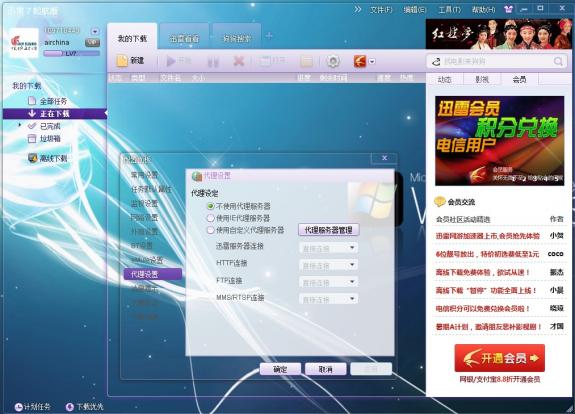
新版迅雷7,色彩绚丽,但是非会员使用异常复杂,下面介绍非会员使用方法经过改良后100%成功案例。
首先下载迅雷7,安装完成之后按照上面要求登陆—— 输入账号密码 ——把登陆改成自动登陆 —–记住密码 —-然后关闭迅雷 —–再次开启迅雷 —–点工具下拉菜单出来(这时候注意不要动) —-登陆成功后—-再点配置 关闭(说错误的对话框) 配置对话框不能关,这样就可以不受限制的使用了。如果不可以再次重启迅雷7即可。
【思维|心智|认知|世界】Pursue Ture happiness and perfection.Learning,Reading,Writing,and Thinking. Here is History and Future.
新版迅雷7,色彩绚丽,但是非会员使用异常复杂,下面介绍非会员使用方法经过改良后100%成功案例。
Comments are closed.
Congratulations for posting such a useful blog. Your blog isn’t only informative but also extremely artistic too. There usually are extremely couple of individuals who can write not so easy articles that creatively. Keep up the good writing !!
Ha ha… I was just online around and took a glimpse at these reviews. I can’t believe there’s still this much interest. Thanks for posting about this.
Congratulations for posting such a useful blog. Your blog isn’t only informative but also extremely artistic too. There usually are extremely couple of individuals who can write not so easy articles that creatively. Keep up the good writing !!
I have read a few of the articles on your website now, and I really like your style of blogging. I added it to my favorites blog site list and will be checking back soon. Please check out my site as well and let me know what you think.
You’ve got a good blog there keep it up. I’ll be watching out for most posts.
You are a very intelligent person!
Wow! Thank you! I permanently needed to write on my website something like that. Can I take a fragment of your post to my blog?
Definitely, what a splendid blog and informative posts, I surely will bookmark your site.Best Regards!
Definitely, what a magnificent blog and illuminating posts, I will bookmark your blog.Have an awsome day!
Great post. This has been very informative.
Aloha dude! I completely agree with your opinion. I have just shared it on Facebook.